Pages

Sunday, December 13, 2009

Google Chrome Extension to Take Screen Capture Easily

Google Chrome Extension to Take Screen Capture Easily

Google Chrome Extensions are publicly launched and now there are numerous options to install on your Chrome Browser which can not only help you but also increase your work productivity. While there are several options for taking website screenshots like Screenshot Captor, Grab Them All, Screengrab for Firefox & aviary.com all of which mostly work for the Firefox Browser and also need to be installed on your computer. But now with the Google Chrome Extensions you can also install a excellent extension by avairy called as the Aviary Screen Capture


You can check out how to Install Chrome Extension and then download it from this url. It adds a small icon near the address bar on the browser as shown below.


Next you need to open the web page you want to take a screenshot of using the address bar and then click on the small avairy extension button, which clicked would give you the following options.



Next click on the Capture Visible Portion of the Page option which would open a new tab on your Chrome Browser and would show you some basic Image editing options and also a option to Save the Image File to your computer. Thats it, you have successfully taken a screenshot of a Online web page easily.

Saturday, December 12, 2009

How does fragmentation affect your PC and why is prevention so important?

How does fragmentation affect your PC and why is prevention so important?

Diskeeper® 2010 performance software is finally here. It can do what no other software can — PREVENT fragmentation before it ever happens.The whole purpose of a computer is to complete complicated tasks fast, but unless disk fragmentation is effeciently eliminated, your PC will continue to slow down regardless of the amount of RAM or storage space added to it.


How does fragmentation affect your PC?


When fragmentation occurs, your PC wastes precious resources by writing fragmented files to the disk. When this happens, it adversely affects the access and write speed of that hard disk, steadily corrupting computer performance causing PC slows, lags and crashes. Because all computers suffer from fragmentation, this is a critical issue to resolve.

Why is fragmentation prevention so important?


By preventing up to 85% of all disk fragmentation, Diskeeper 2010 with new IntelliWrite™ fragmentation prevention technology resolves this issue. When you want to speed up your PC, fragmentation prevention is far and away the most efficient solution. Immediately your computer saves all the resources that would have been wasted writing fragmented files to a disk. For prior fragmentation and for the slight amount that isn’t prevented, Diskeeper has powerful defrag engines that automatically and invisibly handle it — without any effort on your part.
Nothing comes close to Diskeeper 2010!

A few of the benefits of Diskeeper 2010 Home:
  • Prevents up to 85% of fragmentation from ever happening.
  • Dramatically improves Windows® system performance.
  • Increases file read and write speeds.
  • Greatly reduces drive wear.
  • Reduces energy consumption and system cooling requirements.
  • Allows for faster antivirus and spyware scans.
  • Increases system speed and efficiency.

Tuesday, December 8, 2009

Skip RapidShare Download Limits & Waiting Timer

Skip RapidShare Download Limits & Waiting Timer


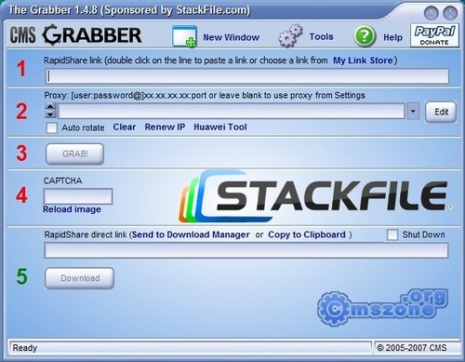
Everyone seems to be downloading more from rapidshare and less from other download services like Megashare, Megaupload etc and this is because its one of the best service which offers two modes – one free and second one paid in which you dont have to wait for downloading your files and you get the speedy servers which would allow you to download the files quickly. Now while you need to download a small bunch of files iam sure you wont be interested in buying a new paid account which is why iam going to tell you a small trick which would allow you to skip the rapidshare timer and also the download limits.


There are many programs which work as Rapidshare download managers but this one seems to be the best one because it allows you to download multiple files at once from Rapidshare. Basically it uses multiple proxy servers and starts downloading the files and works with both rapidhsare.de & rapidshare.com hosted files. You dont have to pay anything for the software because its totally free and since its a download manager in itself, you dont have to load links one by one and start downloadingmultiple files at once. So dont start searching for any other tool and grab the grabber now.

Saturday, December 5, 2009

Consume Less Energy with Solar Mobile Phones Chargers

Consume Less Energy with Solar Mobile Phones Chargers

Typically, cell phone chargers have to be plugged in to an outlet in your home or your office to get them charged. The electricity the charger takes isn’t free. Not only do you have to pay your service provider, you have to pay the electric company to keep it functioning. You can charge your cell phone battery pretty much anywhere if your cell phone dies. With a solar cell phone charger, you also have the capability of charging it outdoors. You do need sunlight to start the process, but most solar cell phone chargers come with a storage device so that you can charge your cell phone even in the middle of the night.

Of course, there are a few questions posed by the idea of a Solar Cell phone Charger. Perhaps most importantly, How does the solar cell phone charger work? Quite simply, instead of relying on the energy companies, the Sun itself will charge the battery for you. Solar chargers can hold on to their charge for up to a year.


Other things you need to consider before purchasing a Solar Cell Phone Charger:


  • How much energy could I save in Kilowatt hours each year using a solar cell phone charger? Most cell phone chargers use approximately 1 watt per day. Although that does not sound like much up front, it does add up. Cell phone chargers in combined right now average enough usage to power 100,000 homes per day.
  • How much time does a solar charger require to fully charge a cell phone? On average, you will need about 3 hours of direct sunlight to charge the 2 Watt Solar charger, or 30 minutes if you have an 18 Watt version.
  • What are the best solar cell phone chargers? There are two that are recommended the most frequently. The first is the iSun which comes with 2 Watts of energy output and is convenient for long road trips. The other is the Solio Classic which combines both electricity and Solar Energy to charge the cell phone.
  • How much waste is produced by manufacturers who produce those “green” solar chargers? Although “Green” is the term of the year, many people have no idea how much waste is still produced in the manufacture of the Green Products. When it comes to transport, and raw materials, used to create them, it is sometimes worse.

TuneUp Live Optimization – Priority for Background Processes

TuneUp Live Optimization – Priority for Background Processes

We can normally count the programs we use every day on one hand. But a typical Windows PC has numerous other programs running in the background, most of which we know nothing about. We only really notice them when the PC stops working at its full performance, suddenly stops working, and programs we are trying to work with just ‘freeze up’.

The new Live Optimization feature from TuneUp Utilities – Version 2010 is the first complete tuning solution to offer protection against these background programs that eat up resources! And the best thing is: This protection is completely automatic, you don’t need to change the way you work or live without specific functions.


What is TuneUp Live Optimization and what makes it so unique?


TuneUp Live Optimization is a dynamic resource administration tool that focuses processor performance on the programs you are actually using. This means that TuneUp Utilities – Version 2010 runs a real-time analysis of the programs you are currently using and bundles the main performance of your PC for these programs. Background processes that eat up resources are automatically given lower priority.


We’ve all experienced it: The program we are in the middle of using just freezes up! Suddenly, nothing works any more and the computer seems to be working too hard. It is at moments like these that you wish your computer had more processor power!

But is a lack of processor power really the problem? Often not! It is all the background programs which have embedded themselves in the information area of thetaskbar, or those which are completely invisible, that really make computers slow and sluggish. These programs often want exactly the same PC resources that you are trying to use for your active applications. And this is exactly where TuneUp Live Optimization comes in: It has an intelligentsystem that recognizes when you want to open, for example, Word, and dynamically allocates more processor power for Word. So there is nothing stopping you from working quicker and more efficiently!


Are you a PC professional? Would you like to try the effect of Live Optimization for yourself?


Then download  PC Stress Test and see the positive effects for yourself. 


The PC Stress Test tool simulates the load on your CPU from programs running in the background. First, make sure that TuneUp Live Optimization is switched off. Now open the PC Stress Test tool and click on “Start”. If you now open Word and attempt to open a document, you will notice that your computer is very sluggish, and it can take up to thirty seconds before you can start your work in Word.

On the trail of the Eureka effect: Now do the same test again once you have ensured that TuneUp Utilities – Version 2010 is installed and Live Optimization is activated. You will notice how TuneUp Live Optimization dynamically assigns more resources to the correct programs and puts the programs that hog the resources in their place. Your programs start more quickly, even when the system is working hard, and run more smoothly. For more fun with your PC!


Friday, November 27, 2009

Download anything for free!!!!!

Download anything for free
 
Download anything with vuze. Vuze is the the most powerful bittorrent application on earth.Vuze (formerly Azureus) is a free BitTorrent client used to transfer files via the BitTorrentprotocol. Vuze is written in Java, and uses the Azureus Engine. In addition to torrenting, Vuze allows users to view, publish and share original DVD and HD quality video content. Content is presented through channels and categories containing TV shows, music videos, movies, video games and others. Additionally, if users prefer to publish their original content, they may monetize it.

Vuze supports the following Vuze Platform specific features:
  • Ability to share torrents between friends and receive "friend boosts". 
  • Browsing and downloading high quality official and/or original content on the Vuze Network.  
  • Chatting between friends.  
  • Advanced comments and ratings.  
  • Content search.  
  • Publishing content. 
  • Exporting media directly to external devices.